SunnyADS Analytics · included with every project
You see what happens after the click.
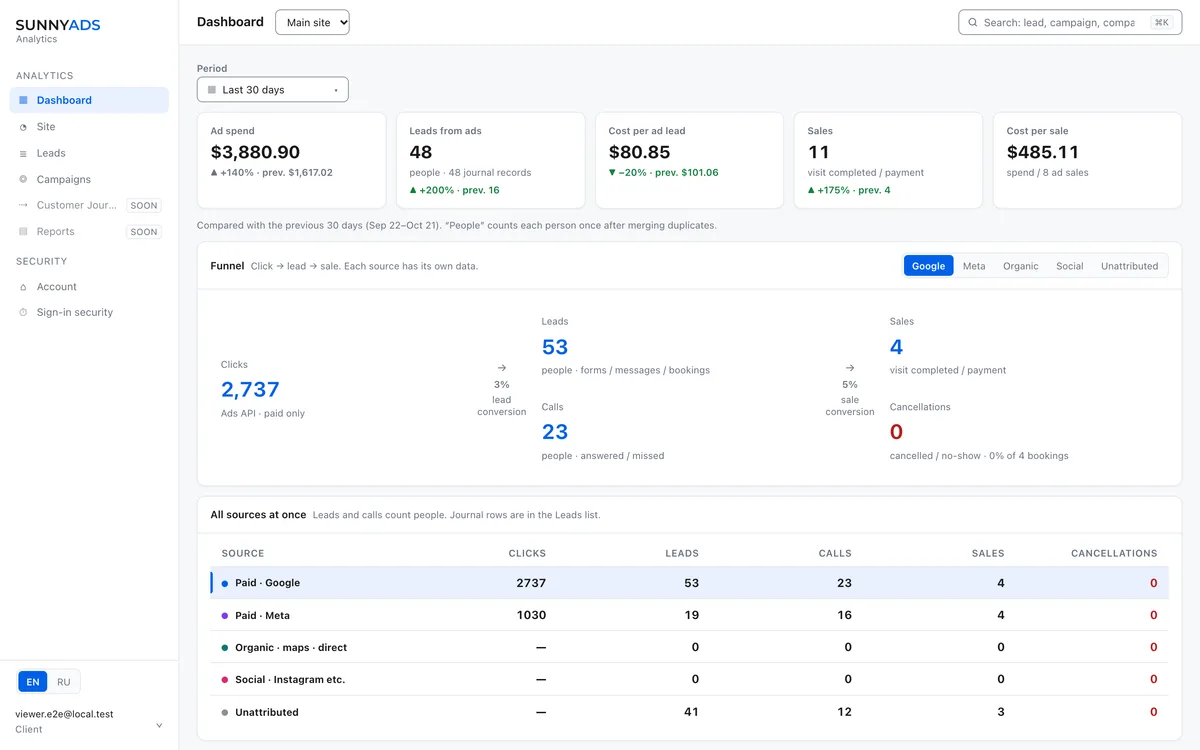
Ad spend, leads, calls, bookings and sales in one dashboard — each one tied to the campaign that brought it. We set it up, you keep the login.
What it answers
Six questions most owners can't answer from the ads dashboard alone.
Where is my money going?
Ad spend comes from Google Ads itself; leads, calls and bookings come from your site and your systems. You see cost per lead, per booking and per call — not just cost per click.
Which campaign brought this customer?
Each lead carries its source and click ID where there is proof. Without proof it stays "Unattributed" — we don't invent sources to make the report look tidy.
Do calls and bookings count?
Yes — answered and missed calls, and bookings made in Fresha or Acuity, not only form fills. A website is not required for this to work.
Is Google Ads learning the right thing?
Completed sales are sent back to Google Ads as offline conversions, so the account optimizes for customers instead of cheap clicks.
What actually happened this week?
A running feed of inquiries, calls, bookings and payments. Each row opens into a record with its history and its source.
Can I check the numbers myself?
The dashboard reads from your own ad account, and your login is scoped to your company. It's your data — ask us and we export it.
The ads manager tells you clicks and spend. It doesn't tell you which click became a paying customer. That gap is what we close.
Inside the dashboard
Money and leads, kept honest.
Money — ads only
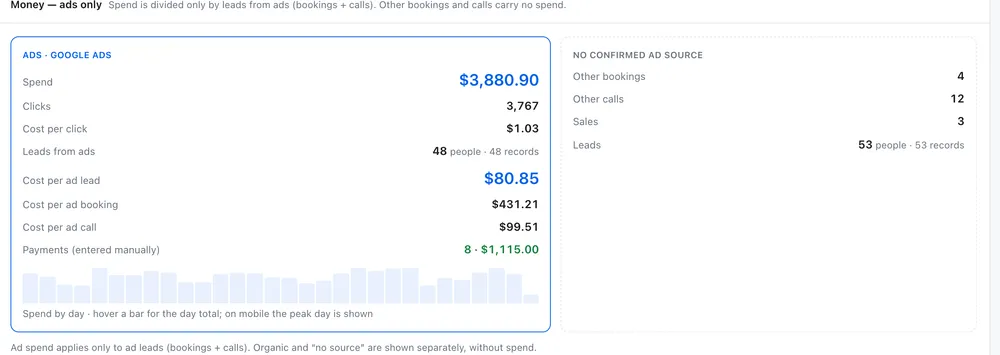
Ad spend is divided only by the leads that came from ads. Organic traffic and results with no confirmed source are shown separately, without spend attached — so one blended number never flatters a campaign that isn't working.
- Spend, clicks and cost per click from the ads account
- Cost per ad lead, per ad booking, per ad call
- Spend by day, to see where the budget actually went
- "No confirmed ad source" as its own column, not hidden
Every inquiry in one list
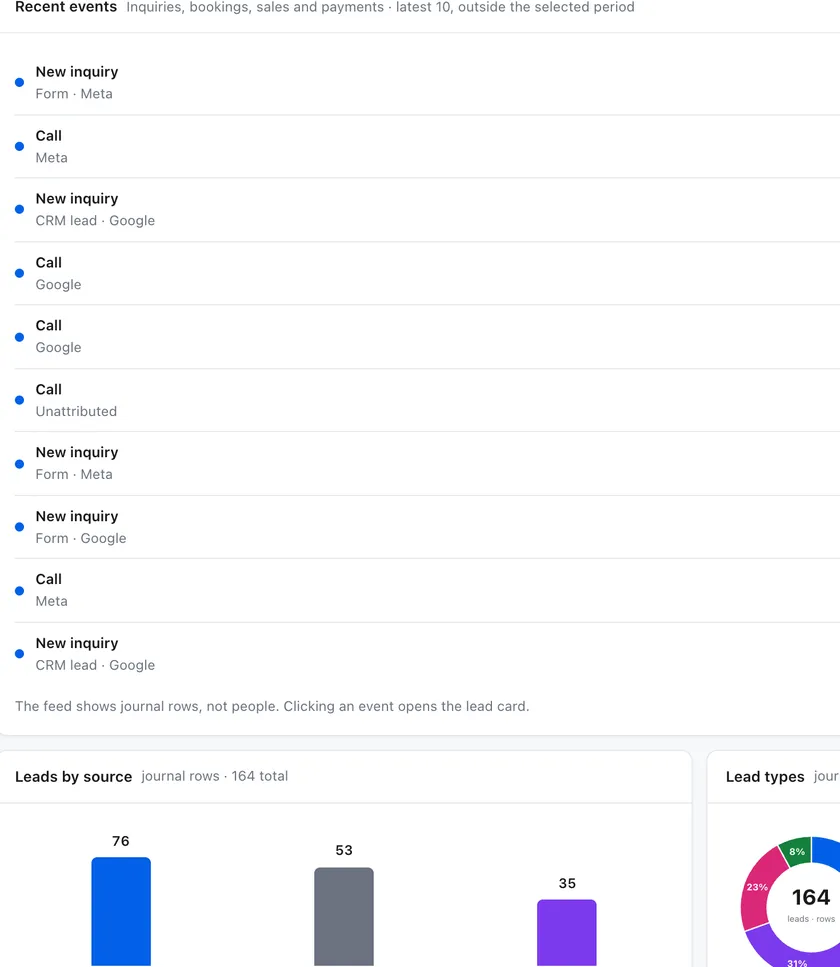
Form fills, calls, CRM leads and bookings land in the same feed, each with the source it came from. A row opens into the record with its history. Contact details are masked by default: this is analysis, not a client base to export.
- Forms, calls, CRM imports and bookings in one place
- Source labeled on every row — Google, Meta, CRM, unattributed
- Journal rows and people counted separately, no double math
- Test and monitoring traffic is filtered out of the counts
Straight talk
What this dashboard is not.
We'd rather set this straight now than have you find it out in month three.
Not a CRM
Your CRM stays the system of record for contacts and deals. We read outcomes and show where they came from — we don't replace your pipeline.
Not a black box
Every metric shows what it counts and what is missing. Partial data is labeled partial instead of being rounded up.
Not self-service SaaS
Access is created by us for the clients we work with. No public signup, no per-seat pricing, no shared catalog.
Not a promise of sales
Measurement shows what happened; it doesn't create demand. What it does is let you move budget to what brings customers.
How it gets set up
Three steps, then you have your own login.
Connect the sources
Google Ads (read-only) and, if you use them, Meta, Fresha or Acuity, your CRM exports and call tracking. Existing history can be imported from CSV.
Put the snippet on your site
One small first-party script — no third-party trackers on your pages. No site? The click still links to the booking or the call.
You get a login
Your company's dashboard, in English or Russian. We review it together and change what the numbers tell us to change.
Included in every project, free while we work together. +$100 one-time GA4 / GTM setup only if you don't have it yet — that part is work; the dashboard is yours.
Questions
Before you decide.
Nothing on top of your project. The dashboard is included and free while we work together. The only separate charge is +$100 one-time for GA4 / GTM setup, and only if you don't have it yet.
Not always. Beauty and service businesses often book through Fresha or Acuity — the ad click is linked to the booking anyway. Calls count too, when call tracking is set up.
You and SunnyADS. Access is scoped to your company, contact details are masked by default in the analytics views, and the platform has no public signup or shared catalog.
The dashboard shows the basis of every metric and marks missing data instead of filling gaps. If a lead has no proof of source, it is listed as unattributed — that is an honest reading, not a bug.
Yes. Your account and your data stay yours. Ask us and we export what you need.
No. Results depend on demand, competition, budget, your offer and how inquiries are handled. What we guarantee is a transparent measurement of what actually happened.
Have a marketing problem you're trying to solve?
Tell us what you're trying to achieve. We'll look at the situation and see what actually needs to be done.
Start a conversation →